> ## Documentation Index
> Fetch the complete documentation index at: https://docs.paypal.ai/llms.txt
> Use this file to discover all available pages before exploring further.
# PayPal payments quick start integration
Accept PayPal payments on your website with the minimum amount of code required. You might use this ultra light integration as a proof of concept, basic e-commerce checkout, or simple donation form.
This integration creates an order and captures a payment. It uses PayPal's JavaScript SDK on the client side and server SDK on the server side.
The JavaScript SDK renders the PayPal button and handles the UI. The server SDK creates and captures orders with your app credentials.
[Check out a sample integration in GitHub](https://github.com/paypal-examples/v6-web-sdk-sample-integration).
## Eligibility
This integration works [everywhere PayPal is available](https://www.paypal.com/webapps/mpp/country-worldwide).
## Prerequisites
* Create a [PayPal developer account](https://developer.paypal.com/dashboard/).
* Get a [client ID and secret](/developer/how-to/api/get-started#1-get-your-client-id-and-client-secret).
* (Optional) Enable negative testing in the developer dashboard:
1. Go to **Dashboard** > **Sandbox** > **Accounts**.
2. Select **...** on your sandbox business account and select **View/Edit**.
3. Enable **Negative Testing** and save.
## Create project structure
Choose your preferred language and set up the project structure.
```bash Node.js lines expandable theme={null}
# Create project structure
mkdir paypal-minimal && cd paypal-minimal
npm init -y
npm install express @paypal/checkout-server-sdk dotenv
mkdir public
# Create .env file with development defaults
cat > .env << 'EOF'
# Development/Sandbox Configuration (Default)
# ==========================================
PAYPAL_CLIENT_ID=your_sandbox_client_id
PAYPAL_CLIENT_SECRET=your_sandbox_secret
NODE_ENV=development
PORT=3000
# Negative Testing (Sandbox Only)
# --------------------------------
# Set to true to enable error simulation in sandbox
ENABLE_NEGATIVE_TESTING=false
NEGATIVE_TEST_TYPE=INSUFFICIENT_FUNDS
# Options: INSUFFICIENT_FUNDS, INSTRUMENT_DECLINED, TRANSACTION_REFUSED,
# INTERNAL_SERVER_ERROR, DUPLICATE_INVOICE_ID
# Production Configuration (Uncomment to use)
# ==========================================
# PAYPAL_CLIENT_ID=your_production_client_id
# PAYPAL_CLIENT_SECRET=your_production_secret
# NODE_ENV=production
# PORT=3000
EOF
# Create empty files
touch server.js
touch public/index.html
echo "✅ Project structure created! Now copy the code below into the files."
```
```bash Python lines expandable theme={null}
# Create project structure
mkdir paypal-minimal && cd paypal-minimal
python -m venv venv
source venv/bin/activate # On Windows: venv\Scripts\activate
pip install flask paypalrestsdk python-dotenv
mkdir templates static
# Create .env file with development defaults
cat > .env << 'EOF'
# Development/Sandbox Configuration (Default)
# ==========================================
PAYPAL_CLIENT_ID=your_sandbox_client_id
PAYPAL_CLIENT_SECRET=your_sandbox_secret
FLASK_ENV=development
PORT=3000
# Negative Testing (Sandbox Only)
# --------------------------------
# Set to true to enable error simulation in sandbox
ENABLE_NEGATIVE_TESTING=false
NEGATIVE_TEST_TYPE=INSUFFICIENT_FUNDS
# Options: INSUFFICIENT_FUNDS, INSTRUMENT_DECLINED, TRANSACTION_REFUSED,
# INTERNAL_SERVER_ERROR, DUPLICATE_INVOICE_ID
# Production Configuration (Uncomment to use)
# ==========================================
# PAYPAL_CLIENT_ID=your_production_client_id
# PAYPAL_CLIENT_SECRET=your_production_secret
# FLASK_ENV=production
# PORT=3000
EOF
# Create requirements.txt
cat > requirements.txt << 'EOF'
flask
paypalrestsdk
python-dotenv
EOF
# Create empty files
touch app.py
touch templates/index.html
echo "✅ Project structure created! Now copy the code below into the files."
```
```bash Java lines expandable theme={null}
# Create Maven project structure
mkdir paypal-minimal && cd paypal-minimal
mkdir -p src/main/java/com/paypal/demo
mkdir -p src/main/resources
mkdir -p src/main/resources/static
# Create pom.xml with dependencies
cat > pom.xml << 'EOF'
4.0.0
com.paypal
paypal-minimal
1.0.0
org.springframework.boot
spring-boot-starter-parent
3.1.0
org.springframework.boot
spring-boot-starter-web
com.paypal.sdk
checkout-sdk
1.0.5
EOF
# Create application.properties
cat > src/main/resources/application.properties << 'EOF'
# Development/Sandbox Configuration (Default)
paypal.client.id=your_sandbox_client_id
paypal.client.secret=your_sandbox_secret
paypal.mode=sandbox
server.port=3000
# Negative Testing (Sandbox Only)
# Set to true to enable error simulation in sandbox
enable.negative.testing=false
negative.test.type=INSUFFICIENT_FUNDS
# Options: INSUFFICIENT_FUNDS, INSTRUMENT_DECLINED, TRANSACTION_REFUSED,
# INTERNAL_SERVER_ERROR, DUPLICATE_INVOICE_ID
# Production Configuration (comment above, uncomment below)
# paypal.client.id=your_production_client_id
# paypal.client.secret=your_production_secret
# paypal.mode=live
# server.port=3000
EOF
# Create empty Java files
touch src/main/java/com/paypal/demo/PayPalController.java
touch src/main/java/com/paypal/demo/Application.java
touch src/main/resources/static/index.html
echo "✅ Project structure created! Now copy the code below into the files."
```
```bash PHP lines expandable theme={null}
# Create project structure
mkdir paypal-minimal && cd paypal-minimal
composer init -n
composer require paypal/paypal-checkout-sdk vlucas/phpdotenv
mkdir public
# Create .env file with development defaults
cat > .env << 'EOF'
# Development/Sandbox Configuration (Default)
# ==========================================
PAYPAL_CLIENT_ID=your_sandbox_client_id
PAYPAL_CLIENT_SECRET=your_sandbox_secret
APP_ENV=development
PORT=3000
# Negative Testing (Sandbox Only)
# --------------------------------
# Set to true to enable error simulation in sandbox
ENABLE_NEGATIVE_TESTING=false
NEGATIVE_TEST_TYPE=INSUFFICIENT_FUNDS
# Options: INSUFFICIENT_FUNDS, INSTRUMENT_DECLINED, TRANSACTION_REFUSED,
# INTERNAL_SERVER_ERROR, DUPLICATE_INVOICE_ID
# Production Configuration (Uncomment to use)
# ==========================================
# PAYPAL_CLIENT_ID=your_production_client_id
# PAYPAL_CLIENT_SECRET=your_production_secret
# APP_ENV=production
# PORT=3000
EOF
# Create empty files
touch index.php
touch public/index.html
echo "✅ Project structure created! Now copy the code below into the files."
```
```bash Ruby lines expandable theme={null}
# Create project structure
mkdir paypal-minimal && cd paypal-minimal
bundle init
# Add gems to Gemfile
cat >> Gemfile << 'EOF'
gem 'sinatra'
gem 'paypal-checkout-sdk'
gem 'dotenv'
EOF
bundle install
mkdir public
# Create .env file with development defaults
cat > .env << 'EOF'
# Development/Sandbox Configuration (Default)
# ==========================================
PAYPAL_CLIENT_ID=your_sandbox_client_id
PAYPAL_CLIENT_SECRET=your_sandbox_secret
RACK_ENV=development
PORT=3000
# Negative Testing (Sandbox Only)
# --------------------------------
# Set to true to enable error simulation in sandbox
ENABLE_NEGATIVE_TESTING=false
NEGATIVE_TEST_TYPE=INSUFFICIENT_FUNDS
# Options: INSUFFICIENT_FUNDS, INSTRUMENT_DECLINED, TRANSACTION_REFUSED,
# INTERNAL_SERVER_ERROR, DUPLICATE_INVOICE_ID
# Production Configuration (Uncomment to use)
# ==========================================
# PAYPAL_CLIENT_ID=your_production_client_id
# PAYPAL_CLIENT_SECRET=your_production_secret
# RACK_ENV=production
# PORT=3000
EOF
# Create empty files
touch app.rb
touch public/index.html
echo "✅ Project structure created! Now copy the code below into the files."
```
## Set up back end
Choose your preferred language and copy the code into your server file:
```bash cURL lines expandable theme={null}
# Create order
curl -X POST https://api-m.sandbox.paypal.com/v2/checkout/orders \
-H "Content-Type: application/json" \
-H "Authorization: Bearer ACCESS_TOKEN" \
-d '{
"intent": "CAPTURE",
"purchase_units": [{
"amount": {
"currency_code": "USD",
"value": "10.00"
}
}]
}'
# Capture order
curl -X POST https://api-m.sandbox.paypal.com/v2/checkout/orders/ORDER_ID/capture \
-H "Content-Type: application/json" \
-H "Authorization: Bearer ACCESS_TOKEN"
```
```javascript Node.js lines expandable theme={null}
require('dotenv').config();
const express = require('express');
const paypal = require('@paypal/checkout-server-sdk');
const app = express();
app.use(express.json());
app.use(express.static('public'));
// PayPal configuration
const environment = process.env.NODE_ENV === 'production'
? new paypal.core.LiveEnvironment(process.env.PAYPAL_CLIENT_ID, process.env.PAYPAL_CLIENT_SECRET)
: new paypal.core.SandboxEnvironment(process.env.PAYPAL_CLIENT_ID, process.env.PAYPAL_CLIENT_SECRET);
const client = new paypal.core.PayPalHttpClient(environment);
// Helper for negative testing
const addNegativeTesting = (request) => {
if (process.env.NODE_ENV !== 'production' && process.env.ENABLE_NEGATIVE_TESTING === 'true' && process.env.NEGATIVE_TEST_TYPE) {
request.headers['PayPal-Mock-Response'] = JSON.stringify({ mock_application_codes: process.env.NEGATIVE_TEST_TYPE });
}
};
// Create order
app.post('/api/orders', async (req, res) => {
const request = new paypal.orders.OrdersCreateRequest();
addNegativeTesting(request);
request.requestBody({
intent: 'CAPTURE',
purchase_units: [{ amount: { currency_code: 'USD', value: req.body.amount || '10.00' } }]
});
try {
const order = await client.execute(request);
res.json({ id: order.result.id });
} catch (err) {
res.status(500).json({ error: err.message });
}
});
// Capture order
app.post('/api/orders/:orderID/capture', async (req, res) => {
const request = new paypal.orders.OrdersCaptureRequest(req.params.orderID);
addNegativeTesting(request);
try {
const capture = await client.execute(request);
res.json({ id: capture.result.id, status: capture.result.status });
} catch (err) {
res.status(500).json({ error: err.message });
}
});
app.listen(process.env.PORT || 3000, () => {
console.log(`Server running on port ${process.env.PORT || 3000} in ${process.env.NODE_ENV === 'production' ? 'production' : 'sandbox'} mode`);
});
```
```python Python lines expandable theme={null}
from flask import Flask, request, jsonify
from paypalrestsdk import Api, Order
import os
app = Flask(__name__)
# Configure PayPal SDK
api = Api({
'mode': 'sandbox' if os.environ.get('FLASK_ENV') != 'production' else 'live',
'client_id': os.environ['PAYPAL_CLIENT_ID'],
'client_secret': os.environ['PAYPAL_CLIENT_SECRET']
})
# Create order
@app.route('/api/orders', methods=['POST'])
def create_order():
try:
order = Order({
"intent": "CAPTURE",
"purchase_units": [{
"amount": {
"currency_code": "USD",
"value": request.json.get('amount', '10.00')
}
}]
})
if order.create():
return jsonify({"id": order.id})
else:
return jsonify({"error": order.error}), 500
except Exception as e:
return jsonify({"error": str(e)}), 500
# Capture order
@app.route('/api/orders//capture', methods=['POST'])
def capture_order(order_id):
try:
order = Order.find(order_id)
if order.capture():
return jsonify({
"id": order.id,
"status": order.status
})
else:
return jsonify({"error": order.error}), 500
except Exception as e:
return jsonify({"error": str(e)}), 500
if __name__ == '__main__':
app.run(port=int(os.environ.get('PORT', 3000)))
```
```java Java lines expandable theme={null}
import com.paypal.core.PayPalEnvironment;
import com.paypal.core.PayPalHttpClient;
import com.paypal.orders.OrdersCreateRequest;
import com.paypal.orders.OrdersCaptureRequest;
import com.paypal.orders.Order;
import org.springframework.web.bind.annotation.*;
import org.springframework.http.ResponseEntity;
@RestController
@RequestMapping("/api")
public class PayPalController {
private PayPalHttpClient httpClient;
public PayPalController() {
String env = System.getenv("NODE_ENV");
PayPalEnvironment environment = "production".equals(env)
? new LiveEnvironment(
System.getenv("PAYPAL_CLIENT_ID"),
System.getenv("PAYPAL_CLIENT_SECRET")
)
: new SandboxEnvironment(
System.getenv("PAYPAL_CLIENT_ID"),
System.getenv("PAYPAL_CLIENT_SECRET")
);
this.httpClient = new PayPalHttpClient(environment);
}
// Create order
@PostMapping("/orders")
public ResponseEntity createOrder(@RequestBody OrderRequest orderRequest) {
try {
OrdersCreateRequest request = new OrdersCreateRequest();
request.requestBody(new OrderRequestBody()
.intent("CAPTURE")
.purchaseUnits(List.of(
new PurchaseUnitRequest()
.amount(new AmountWithBreakdown()
.currencyCode("USD")
.value(orderRequest.getAmount() != null ? orderRequest.getAmount() : "10.00")
)
))
);
HttpResponse response = httpClient.execute(request);
Order order = response.result();
return ResponseEntity.ok(Map.of("id", order.id()));
} catch (Exception e) {
return ResponseEntity.status(500).body(Map.of("error", e.getMessage()));
}
}
// Capture order
@PostMapping("/orders/{orderId}/capture")
public ResponseEntity captureOrder(@PathVariable String orderId) {
try {
OrdersCaptureRequest request = new OrdersCaptureRequest(orderId);
HttpResponse response = httpClient.execute(request);
Order order = response.result();
return ResponseEntity.ok(Map.of(
"id", order.id(),
"status", order.status()
));
} catch (Exception e) {
return ResponseEntity.status(500).body(Map.of("error", e.getMessage()));
}
}
}
```
```php PHP lines expandable theme={null}
body = [
'intent' => 'CAPTURE',
'purchase_units' => [[
'amount' => [
'currency_code' => 'USD',
'value' => $input['amount'] ?? '10.00'
]
]]
];
try {
$response = $client->execute($request);
echo json_encode(['id' => $response->result->id]);
} catch (Exception $e) {
http_response_code(500);
echo json_encode(['error' => $e->getMessage()]);
}
}
// Capture order
if ($_SERVER['REQUEST_METHOD'] === 'POST' && preg_match('/\/api\/orders\/(.+)\/capture/', $_SERVER['REQUEST_URI'], $matches)) {
$orderId = $matches[1];
$request = new OrdersCaptureRequest($orderId);
try {
$response = $client->execute($request);
echo json_encode([
'id' => $response->result->id,
'status' => $response->result->status
]);
} catch (Exception $e) {
http_response_code(500);
echo json_encode(['error' => $e->getMessage()]);
}
}
?>
```
```ruby Ruby lines expandable theme={null}
require 'sinatra'
require 'paypal-checkout-sdk'
require 'json'
# PayPal configuration
environment = ENV['RACK_ENV'] == 'production' ?
PayPal::LiveEnvironment.new(ENV['PAYPAL_CLIENT_ID'], ENV['PAYPAL_CLIENT_SECRET']) :
PayPal::SandboxEnvironment.new(ENV['PAYPAL_CLIENT_ID'], ENV['PAYPAL_CLIENT_SECRET'])
client = PayPal::PayPalHttpClient.new(environment)
# Create order
post '/api/orders' do
content_type :json
request_body = JSON.parse(request.body.read)
order_request = PayPalCheckoutSdk::Orders::OrdersCreateRequest.new
order_request.request_body({
intent: 'CAPTURE',
purchase_units: [{
amount: {
currency_code: 'USD',
value: request_body['amount'] || '10.00'
}
}]
})
begin
response = client.execute(order_request)
{ id: response.result.id }.to_json
rescue StandardError => e
status 500
{ error: e.message }.to_json
end
end
# Capture order
post '/api/orders/:order_id/capture' do
content_type :json
capture_request = PayPalCheckoutSdk::Orders::OrdersCaptureRequest.new(params[:order_id])
begin
response = client.execute(capture_request)
{
id: response.result.id,
status: response.result.status
}.to_json
rescue StandardError => e
status 500
{ error: e.message }.to_json
end
end
```
## Set up front end
Open the `public/index.html` file in a code editor and copy and paste the following code. Replace `YOUR_CLIENT_ID` with the client ID created in the prerequisites.
If your app uses PayPal buttons across multiple pages or a modular JavaScript architecture, see [Multipage and modular app issues](/payments/methods/paypal/troubleshoot#multipage-and-modular-app-issues).
```html lines expandable theme={null}
PayPal Checkout
```
## Set your client ID and secret
Open the `.env` file in a code editor and replace `your_sandbox_client_id` and `your_sandbox_secret` with the client ID and secret you created for your app in the prerequisites.
## Run the application locally
Start the server:
```bash lines theme={null}
node server.js
```
Open the following URL in your browser. You should see a PayPal button.
```
http://localhost:3000
```
[Don't see the button?](/payments/methods/paypal/troubleshoot#the-paypal-button-does-not-appear)
## Best practices
Use the following best practices to ensure secure, reliable, and maintainable integrations when building your checkout experience.
* **Start minimal and expand later:** This code works in production. Add features as needed.
* **Use environment variables:** Never hardcode credentials. Keep the .env file out of Git.
* **Create orders on the server:** Never create orders in the browser due to security risks. Always use the server.
* **Test in sandbox first:** Use sandbox accounts to test payments before going live.
* **Store transaction IDs:** Save capture IDs for refunds, disputes, and record keeping.
## Test your integration
Before testing, make sure you have sandbox account credentials for both buyer and seller roles. [Get sandbox account credentials](/developer/how-to/api/get-started#3-get-sandbox-account-credentials).
### Standard testing
Use the following standard test scenarios to verify your checkout handles key outcomes.
| Test scenario | Setup | Expected result |
| :----------------- | :--------------- | :---------------------------------------------- |
| Successful payment | Default settings | Green success message and transaction ID shown. |
| Cancelled payment | Default settings | Orange cancel message shown. |
| Server error | Stop server | Red error message shown. |
### Negative testing
Negative testing works only in sandbox mode. It is automatically disabled when `NODE_ENV=production`.
For negative testing:
1. Make sure to enable negative testing in your sandbox business account as described in the prerequisites.
2. In the `.env` file, set `ENABLE_NEGATIVE_TESTING=true` and set `NEGATIVE_TEST_TYPE` to one of the error codes in the table.
3. Restart the server after changing the `.env` file: `node server.js`.
| Test scenario | Error code | Expected result |
| :-------------------- | :---------------------- | :---------------------------------------------- |
| Insufficient funds | `INSUFFICIENT_FUNDS` | Error: buyer cannot pay at capture. |
| Instrument declined | `INSTRUMENT_DECLINED` | Error: payment method was declined at capture. |
| Internal server error | `INTERNAL_SERVER_ERROR` | Error: 500 error occurred at create or capture. |
| Transaction refused | `TRANSACTION_REFUSED` | Error: transaction refused at capture. |
| Duplicate invoice ID | `DUPLICATE_INVOICE_ID` | Error: invoice ID must be unique at create. |
## Go-live checklist
* Test all scenarios in the sandbox.
* In the `.env` file:
* Comment out the development section.
* Uncomment the production section.
* Update HTML client ID to production.
* Add the HTTPS certificate.
* Test with real \$1 transaction.
* Verify funds are received in your PayPal account.
## Post-launch monitoring
These values are suggested monitoring thresholds for your integration, not performance guarantees from PayPal.
| Metric | Target | Action if below target |
| :--------------------------- | :---------- | :-------------------------------------------------- |
| Payment success rate | 95% | Check API errors in logs |
| Cancel rate | \<20% | Review checkout UX and pricing display |
| Error rate | \<2% | Check error logs and API responses |
| Order creation response time | \<2 seconds | Optimize server performance and check PayPal status |
| Capture response time | \<3 seconds | Review server performance |
## References
* [PayPal JavaScript SDK v6](/reference/sdk/js/v6/reference)
* [Orders API](https://developer.paypal.com/docs/api/orders/v2/)
* [PayPal Server SDK](https://developer.paypal.com/serversdk/java/getting-started/how-to-get-started)
* [Troubleshoot common issues](/payments/methods/paypal/troubleshoot#quick-start-integration-issues)
## Next steps
The following use cases are common next steps after completing this quick start.
* [Refund a payment](/payments/methods/paypal/refund): Process returns using capture IDs.
* [Void an authorization](/payments/methods/paypal/void-an-authorization): Cancel an order before capture.
## PayPal Checkout flow
A buyer following the PayPal Checkout flow has a PayPal account and uses payment methods like PayPal, Venmo, debit, and credit cards to pay for their order:
* Buyers are aware that PayPal is processing their payments.
* Buyers can pay for the order using any of the PayPal-associated payment methods.
* Payment sources for these orders can be PayPal, Venmo, PayPal Pay Later, debit card, or credit card.

## Orders API flows using PayPal Checkout for Pay with PayPal
This section uses PayPal as the payment source to showcase the possible Orders v2 API flows in a PayPal Checkout integration.
> **Note:** All of the Orders v2 API endpoints are designed for merchants and partners. The payer only comes into picture during the approval or payer action required steps.
You need to pass an `intent` during the order creation. You can select either `CAPTURE` or `AUTHORIZE`:
* `CAPTURE`: Use this intent to capture a payment immediately after the buyer approves the purchase.
* `AUTHORIZE`: Use this option to authorize a buyer's funds before you capture payment and settle the purchase later. An authorization places a hold on the money and is valid for 29 days.
### Orders v2 API, detailed PayPal Checkout flow
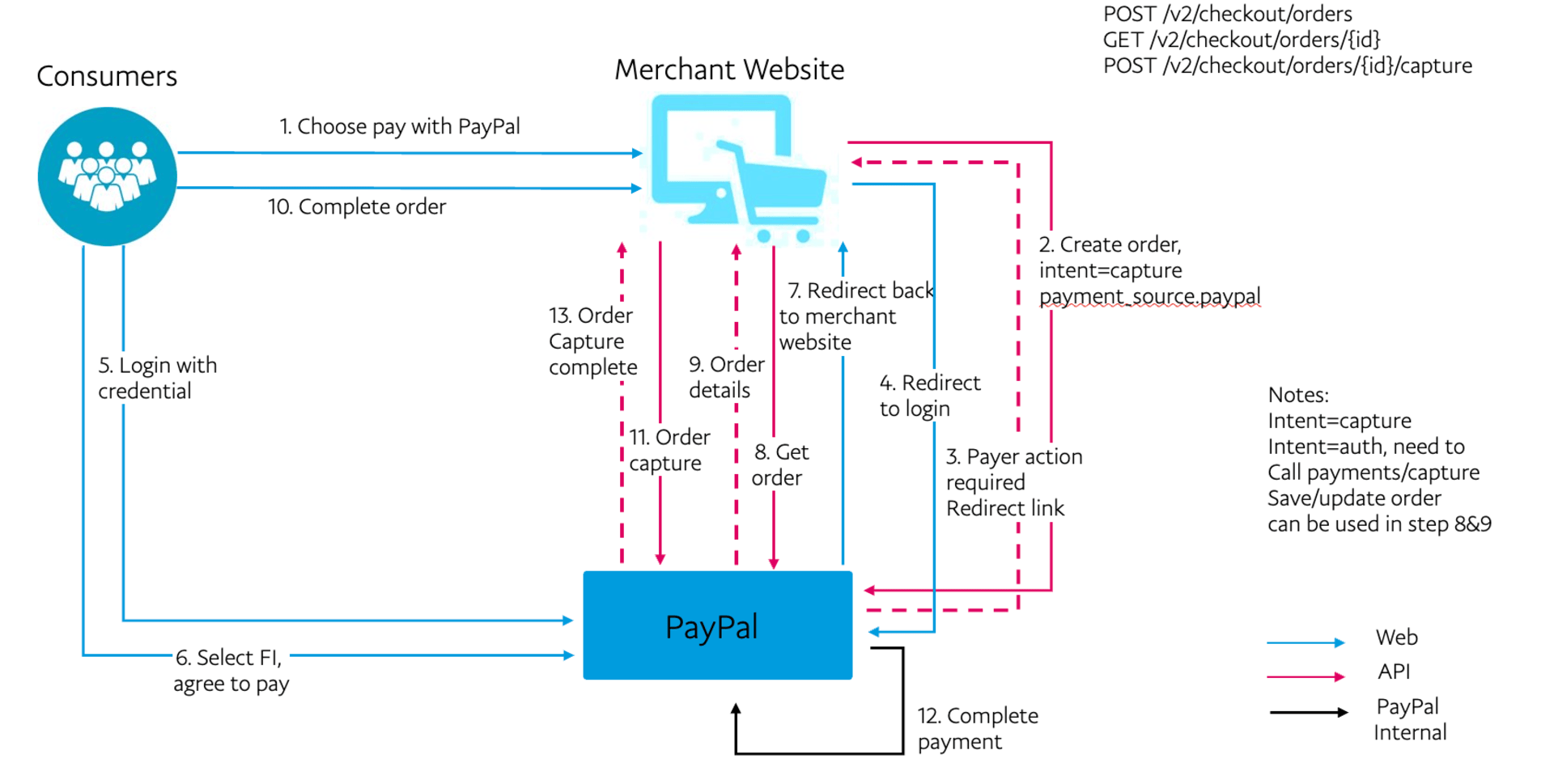
### Multi-step order flow with PayPal Checkout
There are 3 different ways to complete a PayPal Checkout payment:
#### PayPal Checkout with the payment source in a create order request
1. Create the order: pass the `payment_source` in the payload.
2. Payer action required: send the payer to the **Review your purchase** page.
3. Capture or authorize payment.
4. Set up shipment tracking for physical goods.
#### PayPal Checkout with the confirm payment source endpoint
1. Create the order.
2. Confirm the payment source: pass the `payment_source` in the payload.
3. Payer action required: send the payer to the **Review your purchase** page.
4. Capture order.
5. Set up shipment tracking for physical goods.
#### PayPal Checkout with the authorize order endpoint
Create the order.
1. Payer action required: send the payer to the **Review your purchase** page.
2. Authorize order.
3. Capture payment.
4. Set up shipment tracking for physical goods.
#### Other API endpoints
1. Get order details.
2. Update order details.
> **Note:** After you create an order, you have 3 hours to capture or modify that order. The order will remain in the `CREATED` state for only 3 hours. You can extend it up to 72 hours based on your use case. Connect with your TAM for more details.
## Prerequisites
If you are a first-time user who wants to know where to get your access token, how to use the API suite, and complete Postman setup details, refer to Get started with PayPal REST APIs.
See PayPal's [Postman Collection](https://paypalcorp.postman.co/workspace/Test-Orders~269da256-27a0-4d00-9140-d9244798cb46/collection/31769881-80680620-c12a-4e9a-b496-a29cc1e9f1e8?action=share\&creator=31769881) for the latest Orders v2 API payloads.
> **Note:** Set up your server to call the Orders v2 API instead of making calls directly from the browser or the client-side.
## Sample JSON order request 1: Single-step order flow
This example uses PayPal as the payment source for creating a multi-step order. When the buyer chooses the payment method on the **Review Your Payment** (RYP) page and approves the purchase, you can capture the funds or authorize them for later, depending on the intent you choose during order creation.
### Step 1: Create order
Set the order `intent` to `AUTHORIZE` or `CAPTURE`. A successful request returns an HTTPS `200 OK` status code with a `payer-action-required` order status. The following code samples show both the `AUTHORIZE` and `CAPTURE` intents.
Sample create order request with intent `AUTHORIZE`:
```bash lines expandable Request theme={null}
curl -v -X POST "https://api-m.sandbox.paypal.com/v2/checkout/orders/"
-H 'Content-Type: application/json'
-H 'Authorization: Bearer ACCESS-TOKEN'
-d '{
"intent": "AUTHORIZE",
"purchase_units": [
{
"reference_id": "d9f80740-38f0-11e8-b467-0ed5f89f718b",
"amount": {
"currency_code": "USD",
"value": "100.00"
}
}
],
"payment_source": {
"paypal": {
"address": {
"address_line_1": "2211 N First Street",
"address_line_2": "17.3.160",
"admin_area_1": "CA",
"admin_area_2": "San Jose",
"postal_code": "95131",
"country_code": "US"
},
"email_address":"payer@example.com",
"payment_method_preference": "IMMEDIATE_PAYMENT_REQUIRED",
"experience_context": {
"return_url": "https://example.com/returnUrl",
"cancel_url": "https://example.com/cancelUrl"
}
}
}
}'
```
```json lines expandable Response theme={null}
{
"id": "ORDER-ID",
"status": "PAYER_ACTION_REQUIRED",
"payment_source": {
"paypal": {
"email_address": "payer@example.com",
"address": {
"address_line_1": "2211 N First Street",
"address_line_2": "17.3.160",
"admin_area_2": "San Jose",
"admin_area_1": "CA",
"postal_code": "95131",
"country_code": "US"
}
}
},
"payer": {
"email_address": "payer@example.com",
"address": {
"address_line_1": "2211 N First Street",
"address_line_2": "17.3.160",
"admin_area_2": "San Jose",
"admin_area_1": "CA",
"postal_code": "95131",
"country_code": "US"
}
},
"links": [
{
"href": "https://api.sandbox.paypal.com/v2/checkout/orders/0KD30046EH157382X",
"rel": "self",
"method": "GET"
},
{
"href": "https://www.sandbox.paypal.com/checkoutnow?token=0KD30046EH157382X",
"rel": "payer-action",
"method": "GET"
}
]
}
```
Sample create order request with intent `CAPTURE`:
```bash lines expandable Request theme={null}
curl -v -X POST "https://api-m.sandbox.paypal.com/v2/checkout/orders/"
-H 'Content-Type: application/json'
-H 'Authorization: Bearer ACCESS-TOKEN'
-d '{
"intent": "CAPTURE",
"purchase_units": [
{
"reference_id": "d9f80740-38f0-11e8-b467-0ed5f89f718b",
"amount": {
"currency_code": "USD",
"value": "100.00"
}
}
],
"payment_source": {
"paypal": {
"address": {
"address_line_1": "2211 N First Street",
"address_line_2": "17.3.160",
"admin_area_1": "CA",
"admin_area_2": "San Jose",
"postal_code": "95131",
"country_code": "US"
},
"email_address":"payer@example.com",
"payment_method_preference": "IMMEDIATE_PAYMENT_REQUIRED",
"experience_context": {
"return_url": "https://example.com/returnUrl",
"cancel_url": "https://example.com/cancelUrl"
}
}
}
}'
```
```json lines expandable Response theme={null}
{
"id": "0KD30046EH157382X",
"status": "PAYER_ACTION_REQUIRED",
"payment_source": {
"paypal": {
"email_address": "payer@example.com",
"address": {
"address_line_1": "2211 N First Street",
"address_line_2": "17.3.160",
"admin_area_2": "San Jose",
"admin_area_1": "CA",
"postal_code": "95131",
"country_code": "US"
}
}
},
"payer": {
"email_address": "payer@example.com",
"address": {
"address_line_1": "2211 N First Street",
"address_line_2": "17.3.160",
"admin_area_2": "San Jose",
"admin_area_1": "CA",
"postal_code": "95131",
"country_code": "US"
}
},
"links": [
{
"href": "https://api.sandbox.paypal.com/v2/checkout/orders/0KD30046EH157382X",
"rel": "self",
"method": "GET"
},
{
"href": "https://www.sandbox.paypal.com/checkoutnow?token=0KD30046EH157382X",
"rel": "payer-action",
"method": "GET"
}
]
}
```
### Include shipping details
Manage the shipping details for an order by including `shipping_preference` in the `experience_context` for the payment method defined in the `payment_source` object. For example, `payment_source.paypal.experience_context.shipping_preference` or `payment_source.venmo.experience_context.shipping_preference`.
The `shipping_preference` parameter accepts 3 options:
1. **Use buyer's PayPal shipping address (default):** When you set the `shipping_preference` parameter to `GET_FROM_FILE`, PayPal uses the buyer's shipping address directly from their PayPal account. This is the default option when there is no `shipping_preference` value.
2. **Ask buyer to provide address:** When you have the buyer’s address while creating the order and want to pass it as part of the request, add the `shipping_preference` field to `payment_source.paypal.experience_context` and set its value to `SET_FROM_PROVIDER`. You need to pass that address in the `purchase_units` section of the request. The following **Sample shipping request** payload shows how to include the shipping address. An important note: buyers cannot edit this address on the PayPal side.
3. **No shipping:** For digital goods or gift cards that have no physical delivery address, set the `shipping_preference` parameter to `NO_SHIPPING`.
See the Orders v2 API for more information.
#### Sample shipping request
This sample request passes the shipping details using the the `purchase_units.shipping` object.
```bash lines expandable theme={null}
curl -v -X POST "https://api-m.sandbox.paypal.com/v2/checkout/orders/"
-H 'Content-Type: application/json'
-H 'Authorization: Bearer ACCESS-TOKEN'
-d '{
"intent": "CAPTURE",
"purchase_units": [
{
"reference_id": "d9f80740-38f0-11e8-b467-0ed5f89f718b",
"amount": {
"currency_code": "USD",
"value": "100.00"
},
"shipping": {
"name": {
"full_name": "Firstname Lastname"
},
"address": {
"address_line_1": "2211 N First Street",
"address_line_2": "Building 17",
"admin_area_2": "San Jose",
"admin_area_1": "CA",
"postal_code": "95131",
"country_code": "US"
}
}
}
],
"payment_source": {
"paypal": {
"address": {
"address_line_1": "2211 N First Street",
"address_line_2": "17.3.160",
"admin_area_1": "CA",
"admin_area_2": "San Jose",
"postal_code": "95131",
"country_code": "US"
},
"email_address":"payer@example.com",
"payment_method_preference": "IMMEDIATE_PAYMENT_REQUIRED",
"experience_context": {
"return_url": "https://example.com/returnUrl",
"cancel_url": "https://example.com/cancelUrl",
"shipping_preference": "SET_FROM_PROVIDER"
}
}
}
}'
```
### Step 2: Buyer approval
After successfully creating the order, redirect the buyer to the RYP page. The Create order API response passes the RYP page URL as a HATEOS link using the `payer-action` parameter in the `links` section.
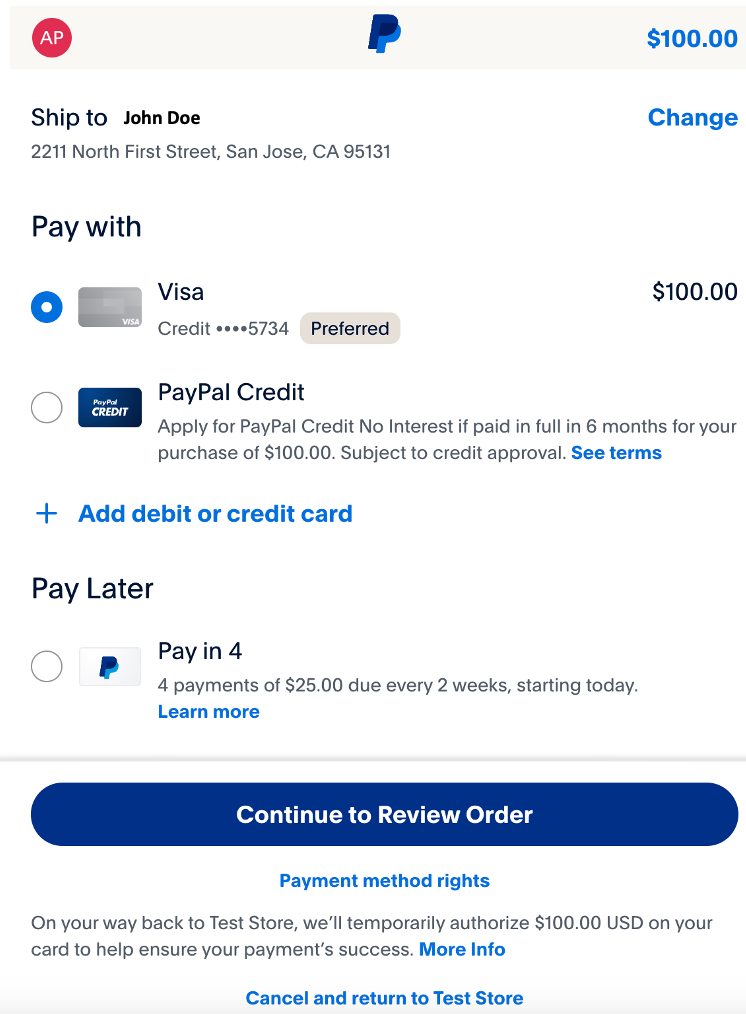
When the buyer selects **Continue to Review Order**, they will be redirected to the `return_url` in the `experience_context` object. Replace it with the URL of the page where the buyer:
* Sees the final order amount.
* Reviews their final order.
**Continue to Review Order** is the default behavior. If you know the final order amount upfront while creating the order, such as shipping and taxes, and will not modify the order later, use the `PAY_NOW` flow to complete the payment in one go without requiring further action from the buyer on the merchant site.
Set this option in `paypal.experience_context.user_action`:
* `CONTINUE` is the default value for `user_action`.
* Choose `PAY_NOW` if you know the final amount before the buyer reaches the first review page.
### Step 3: Authorize or capture order
Both authorize and capture API requests accept `payment_source` as an input, but it's optional. See the preceding create order payload for the payment source. Learn more about authorize and capture.
#### Capture order
After the order has been created and the payer approves the purchase, capture the order by sending a `POST` request and the order ID to the `/v2/checkout/orders/ORDER-ID/capture` endpoint. The following sample request and response show the result of sending a capture order request without a request body:
Sample capture order request:
```bash Request theme={null}
curl -v -X POST "https://api-m.sandbox.paypal.com/v2/checkout/orders/ORDER-ID/capture"
-H 'Content-Type: application/json'
-H 'Authorization: Bearer ACCESS-TOKEN'
-d '{}'
```
```json lines expandable Response theme={null}
{
"id": "0KD30046EH157382X",
"intent": "CAPTURE",
"status": "COMPLETED",
"payment_source": {
"paypal": {
"email_address": "payer@example.com",
"account_id": "PAYER-ID",
"account_status": "UNVERIFIED",
"name": {
"given_name": "Firstname",
"surname": "Lastname"
},
"address": {
"address_line_1": "2211 N First Street",
"address_line_2": "17.3.160",
"admin_area_2": "San Jose",
"admin_area_1": "CA",
"postal_code": "95131",
"country_code": "US"
}
}
},
"purchase_units": [
{
"reference_id": "d9f80740-38f0-11e8-b467-0ed5f89f718b",
"amount": {
"currency_code": "USD",
"value": "100.00"
},
"payee": {
"email_address": "payee@example.com",
"merchant_id": "MERCHANT-ID"
},
"soft_descriptor": "PAYPAL *TEST STORE",
"shipping": {
"name": {
"full_name": "Firstname Lastname"
},
"address": {
"address_line_1": "123 Main St.",
"admin_area_1": "CA",
"admin_area_2": "Anytown",
"postal_code": "12345",
"country_code": "US"
}
},
"payments": {
"captures": [
{
"id": "CAPTURE-ID",
"status": "COMPLETED",
"amount": {
"currency_code": "USD",
"value": "100.00"
},
"final_capture": true,
"seller_protection": {
"status": "ELIGIBLE",
"dispute_categories": [
"ITEM_NOT_RECEIVED",
"UNAUTHORIZED_TRANSACTION"
]
},
"seller_receivable_breakdown": {
"gross_amount": {
"currency_code": "USD",
"value": "100.00"
},
"paypal_fee": {
"currency_code": "USD",
"value": "3.98"
},
"net_amount": {
"currency_code": "USD",
"value": "96.02"
}
},
"links": [
{
"href": "https://api.sandbox.paypal.com/v2/payments/captures/CAPTURE-ID",
"rel": "self",
"method": "GET"
},
{
"href": "https://api.sandbox.paypal.com/v2/payments/captures/CAPTURE-ID/refund",
"rel": "refund",
"method": "POST"
},
{
"href": "https://api.sandbox.paypal.com/v2/checkout/orders/ORDER-ID",
"rel": "up",
"method": "GET"
}
],
"create_time": "2024-03-15T20:41:04Z",
"update_time": "2024-03-15T20:41:04Z"
}
]
}
}
],
"payer": {
"name": {
"given_name": "Firstname",
"surname": "Lastname"
},
"email_address": "payer@example.com",
"payer_id": "PAYER-ID",
"address": {
"address_line_1": "123 Main St.",
"admin_area_1": "CA",
"admin_area_2": "Anytown",
"postal_code": "12345",
"country_code": "US"
}
},
"create_time": "2024-03-15T19:57:25Z",
"update_time": "2024-03-15T20:41:04Z",
"links": [
{
"href": "https://api.sandbox.paypal.com/v2/checkout/orders/ORDER-ID",
"rel": "self",
"method": "GET"
}
]
}
```
After the order has been created, call the Authorize payment for order endpoint of the Orders v2 API by passing the order ID in a `POST` request to `/v2/checkout/orders/ORDER-ID/authorize`. The following sample request and response show the result of calling the authorize order endpoint without a request body:
Sample authorize order request with intent `AUTHORIZE`:
```bash Request theme={null}
curl -v -X POST "https://api-m.sandbox.paypal.com/v2/checkout/orders/ORDER-ID/authorize"
-H 'Content-Type: application/json'
-H 'Authorization: Bearer ACCESS-TOKEN'
-d '{}'
```
```json expandable lines Response theme={null}
{
"id": "ORDER-ID",
"intent": "AUTHORIZE",
"status": "COMPLETED",
"payment_source": {
"paypal": {
"email_address": "payer@example.com",
"account_id": "PAYER-ID",
"account_status": "UNVERIFIED",
"name": {
"given_name": "Firstname",
"surname": "Lastname"
},
"address": {
"address_line_1": "2211 N First Street",
"address_line_2": "17.3.160",
"admin_area_2": "San Jose",
"admin_area_1": "CA",
"postal_code": "95131",
"country_code": "US"
}
}
},
"purchase_units": [
{
"reference_id": "d9f80740-38f0-11e8-b467-0ed5f89f718b",
"amount": {
"currency_code": "USD",
"value": "100.00"
},
"payee": {
"email_address": "payee@example.com",
"merchant_id": "MERCHANT-ID"
},
"soft_descriptor": "PAYPAL *TEST STORE",
"shipping": {
"name": {
"full_name": "Firstname Lastname"
},
"address": {
"address_line_1": "2211 North First Street",
"admin_area_2": "San Jose",
"admin_area_1": "CA",
"postal_code": "95131",
"country_code": "US"
}
},
"payments": {
"authorizations": [
{
"status": "CREATED",
"id": "AUTHORIZATION-ID",
"amount": {
"currency_code": "USD",
"value": "100.00"
},
"seller_protection": {
"status": "ELIGIBLE",
"dispute_categories": [
"ITEM_NOT_RECEIVED",
"UNAUTHORIZED_TRANSACTION"
]
},
"expiration_time": "2024-04-13T20:57:44Z",
"links": [
{
"href": "https://api.sandbox.paypal.com/v2/payments/authorizations/AUTHORIZATION-ID",
"rel": "self",
"method": "GET"
},
{
"href": "https://api.sandbox.paypal.com/v2/payments/authorizations/AUTHORIZATION-ID/capture",
"rel": "capture",
"method": "POST"
},
{
"href": "https://api.sandbox.paypal.com/v2/payments/authorizations/AUTHORIZATION-ID/void",
"rel": "void",
"method": "POST"
},
{
"href": "https://api.sandbox.paypal.com/v2/payments/authorizations/AUTHORIZATION-ID/reauthorize",
"rel": "reauthorize",
"method": "POST"
},
{
"href": "https://api.sandbox.paypal.com/v2/checkout/orders/ORDER-ID",
"rel": "up",
"method": "GET"
}
],
"create_time": "2024-03-15T20:57:44Z",
"update_time": "2024-03-15T20:57:44Z"
}
]
}
}
],
"payer": {
"name": {
"given_name": "Firstname",
"surname": "Lastname"
},
"email_address": "payer@example.com",
"payer_id": "PAYER-ID",
"address": {
"address_line_1": "123 Main St.",
"admin_area_1": "CA",
"admin_area_2": "Anytown",
"postal_code": "12345",
"country_code": "US"
}
},
"create_time": "2024-03-15T20:54:21Z",
"update_time": "2024-03-15T20:57:44Z",
"links": [
{
"href": "https://api.sandbox.paypal.com/v2/checkout/orders/ORDER-ID",
"rel": "self",
"method": "GET"
}
]
}
```
Authorization requires an additional step to complete the payment.
Complete the authorization process and the transaction by sending a `POST` request to `v2/payments/authorizations/AUTHORIZATION-ID/capture` to call the Capture authorized payment endpoint of the Payments v2 API. This step triggers a call to the payment gateway to capture the payment.
> **Note:** You can authorize the total amount or a part of the total amount. To authorize a partial payment, pass the amount in the request payload. For more information, refer to the Capture authorized payment endpoint of the Payments v2 API.
The following sample request and response show the result of calling the capture API endpoint without a request body.
> **Note:** The Payments capture is not the Order capture call.
Sample capture authorized order request:
```bash Request theme={null}
curl -v -X POST "https://api-m.sandbox.paypal.com/v2/payments/authorizations/AUTHORIZATION-ID/capture"
-H 'Content-Type: application/json'
-H 'Authorization: Bearer ACCESS-TOKEN'
-d '{}'
```
```json lines expandable Response theme={null}
{
"id": "AUTHORIZATION-ID",
"amount": {
"currency_code": "USD",
"value": "100.00"
},
"final_capture": true,
"seller_protection": {
"status": "ELIGIBLE",
"dispute_categories": [
"ITEM_NOT_RECEIVED",
"UNAUTHORIZED_TRANSACTION"
]
},
"seller_receivable_breakdown": {
"gross_amount": {
"currency_code": "USD",
"value": "100.00"
},
"paypal_fee": {
"currency_code": "USD",
"value": "3.98"
},
"net_amount": {
"currency_code": "USD",
"value": "96.02"
},
"exchange_rate": {}
},
"status": "COMPLETED",
"create_time": "2024-03-15T20:59:52Z",
"update_time": "2024-03-15T20:59:52Z",
"links": [
{
"href": "https://api.sandbox.paypal.com/v2/payments/captures/CAPTURE-ID",
"rel": "self",
"method": "GET"
},
{
"href": "https://api.sandbox.paypal.com/v2/payments/captures/CAPTURE-ID/refund",
"rel": "refund",
"method": "POST"
},
{
"href": "https://api.sandbox.paypal.com/v2/payments/authorizations/AUTHORIZATION-ID",
"rel": "up",
"method": "GET"
}
]
}
```
#### Step 4: Shipment tracking
If you have physical goods in your order, you can use the Shipment Tracking API to add tracking information to your packages, such as carrier, item, and SKU details.
* If the `intent` is set to `CAPTURE`, replace `CAPTURE-ID` with the `payments.captures.id` field that is found in the Order capture's API response.
* If the `intent` is set to `AUTHORIZE`, replace `CAPTURE-ID` with the ID field found in the Payment capture API response, not the Order API’s capture call.
The `capture_id` field is automatically populated if you're using the PayPal Postman collection.
> **Note:** See the Add tracking information for an order endpoint of the Orders v2 API for more information about each field in the payload.
Sample shipment tracking request and response:
```bash expandable lines Request theme={null}
curl -v -X POST "https://api-m.sandbox.paypal.com/v2/checkout/orders/ORDER-ID/track"
-H 'Content-Type: application/json'
-H 'Authorization: Bearer ACCESS-TOKEN'
-d '{
"capture_id": "CAPTURE-ID",
"tracking_number": "TRACKING-ID",
"carrier": "FEDEX",
"notify_payer": true,
"items": [
{
"name": "T-Shirt",
"sku": "sku02",
"quantity": "1",
"upc": {
"type": "UPC-A",
"code": "upc001"
},
"image_url": "https://www.example.com/example.jpg",
"url": "https://www.example.com/example"
}
]
}'
```
```json expandable lines Response theme={null}
{
"id": "ORDER-ID",
"intent": "CAPTURE",
"status": "COMPLETED",
"payment_source": {
"paypal": {
"email_address": "payer@example.com",
"account_id": "PAYER-ID",
"account_status": "UNVERIFIED",
"name": {
"given_name": "Firstname",
"surname": "Lastname"
},
"address": {
"address_line_1": "2211 N First Street",
"address_line_2": "17.3.160",
"admin_area_2": "San Jose",
"admin_area_1": "CA",
"postal_code": "95131",
"country_code": "US"
}
}
},
"purchase_units": [
{
"reference_id": "d9f80740-38f0-11e8-b467-0ed5f89f718b",
"amount": {
"currency_code": "USD",
"value": "100.00"
},
"payee": {
"email_address": "payee@example.com",
"merchant_id": "MERCHANT-ID"
},
"soft_descriptor": "PAYPAL *TEST STORE",
"shipping": {
"name": {
"full_name": "Firstname Lastname"
},
"address": {
"address_line_1": "123 Main St.",
"admin_area_1": "CA",
"admin_area_2": "Anytown",
"postal_code": "12345",
"country_code": "US"
},
"trackers": [
{
"id": "TRACKING-ID",
"items": [
{
"name": "T-Shirt",
"sku": "sku02",
"quantity": "1",
"image_url": "https://www.example.com/example.jpg",
"upc": {
"type": "UPC-A",
"code": "upc001"
},
"url": "https://www.example.com/example"
}
],
"links": [
{
"href": "https://api.sandbox.paypal.com/v2/checkout/orders/ORDER-ID",
"rel": "up",
"method": "GET"
},
{
"href": "https://api.sandbox.paypal.com/v2/checkout/orders/ORDER-ID/trackers/TRACKING-ID",
"rel": "update",
"method": "PATCH"
}
],
"status": "SHIPPED"
}
]
},
"payments": {
"captures": [
{
"id": "CAPTURE-ID",
"status": "COMPLETED",
"amount": {
"currency_code": "USD",
"value": "100.00"
},
"final_capture": true,
"seller_protection": {
"status": "ELIGIBLE",
"dispute_categories": [
"ITEM_NOT_RECEIVED",
"UNAUTHORIZED_TRANSACTION"
]
},
"seller_receivable_breakdown": {
"gross_amount": {
"currency_code": "USD",
"value": "100.00"
},
"paypal_fee": {
"currency_code": "USD",
"value": "3.98"
},
"net_amount": {
"currency_code": "USD",
"value": "96.02"
}
},
"links": [
{
"href": "https://api.sandbox.paypal.com/v2/payments/captures/CAPTURE-ID",
"rel": "self",
"method": "GET"
},
{
"href": "https://api.sandbox.paypal.com/v2/payments/captures/CAPTURE-ID/refund",
"rel": "refund",
"method": "POST"
},
{
"href": "https://api.sandbox.paypal.com/v2/checkout/orders/ORDER-ID",
"rel": "up",
"method": "GET"
}
],
"create_time": "2024-03-15T21:14:36Z",
"update_time": "2024-03-15T21:14:36Z"
}
]
}
}
],
"payer": {
"name": {
"given_name": "Firstname",
"surname": "Lastname"
},
"email_address": "payer@example.com",
"payer_id": "PAYER-ID",
"address": {
"address_line_1": "2211 N First Street",
"address_line_2": "17.3.160",
"admin_area_2": "San Jose",
"admin_area_1": "CA",
"postal_code": "95131",
"country_code": "US"
}
},
"create_time": "2024-03-15T21:14:07Z",
"update_time": "2024-03-15T21:14:36Z",
"links": [
{
"href": "https://api.sandbox.paypal.com/v2/checkout/orders/ORDER-ID",
"rel": "self",
"method": "GET"
}
]
}
```
> **Note:** See Integrate package tracking for more details about adding package tracking numbers to your orders with the Orders v2 API.
#### Step 5: Show the order details
You can get the details of an order at any stage by sending a `GET` call to the Show order details endpoint of the Orders v2 API.
Sample show order details request with an authorization token:
```bash Request theme={null}
curl -v -X GET "https://api-m.sandbox.paypal.com/v2/checkout/orders/ORDER-ID" \
-H 'Authorization: Bearer ACCESS-TOKEN'
```
```json lines expandable Response theme={null}
{
"id": "ORDER-ID",
"intent": "AUTHORIZE",
"status": "COMPLETED",
"payment_source": {
"paypal": {
"email_address": "payer@example.com",
"account_id": "PAYER-ID",
"account_status": "UNVERIFIED",
"name": {
"given_name": "Firstname",
"surname": "Lastname"
},
"address": {
"address_line_1": "123 Main St.",
"admin_area_1": "CA",
"admin_area_2": "Anytown",
"postal_code": "12345",
"country_code": "US"
}
}
},
"purchase_units": [
{
"reference_id": "d9f80740-38f0-11e8-b467-0ed5f89f718b",
"amount": {
"currency_code": "USD",
"value": "100.00"
},
"payee": {
"email_address": "payee@example.com",
"merchant_id": "MERCHANT-ID"
},
"soft_descriptor": "PAYPAL *TEST STORE",
"shipping": {
"name": {
"full_name": "Firstname Lastname"
},
"address": {
"address_line_1": "123 Main St.",
"admin_area_1": "CA",
"admin_area_2": "Anytown",
"postal_code": "12345",
"country_code": "US"
}
},
"payments": {
"authorizations": [
{
"status": "CAPTURED",
"id": "AUTHORIZATION-ID",
"amount": {
"currency_code": "USD",
"value": "100.00"
},
"seller_protection": {
"status": "ELIGIBLE",
"dispute_categories": [
"ITEM_NOT_RECEIVED",
"UNAUTHORIZED_TRANSACTION"
]
},
"expiration_time": "2024-04-13T20:57:44Z",
"links": [
{
"href": "https://api-m.sandbox.paypal.com/v2/payments/authorizations/AUTHORIZATION-ID",
"rel": "self",
"method": "GET"
},
{
"href": "https://api-m.sandbox.paypal.com/v2/payments/authorizations/AUTHORIZATION-ID/capture",
"rel": "capture",
"method": "POST"
},
{
"href": "https://api-m.sandbox.paypal.com/v2/payments/authorizations/AUTHORIZATION-ID/void",
"rel": "void",
"method": "POST"
},
{
"href": "https://api-m.sandbox.paypal.com/v2/payments/authorizations/AUTHORIZATION-ID/reauthorize",
"rel": "reauthorize",
"method": "POST"
},
{
"href": "https://api-m.sandbox.paypal.com/v2/checkout/orders/ORDER-ID",
"rel": "up",
"method": "GET"
}
],
"create_time": "2024-03-15T20:57:44Z",
"update_time": "2024-03-15T20:59:52Z"
}
],
"captures": [
{
"id": "CAPTURE-ID",
"status": "COMPLETED",
"amount": {
"currency_code": "USD",
"value": "100.00"
},
"final_capture": true,
"disbursement_mode": "INSTANT",
"seller_protection": {
"status": "ELIGIBLE",
"dispute_categories": [
"ITEM_NOT_RECEIVED",
"UNAUTHORIZED_TRANSACTION"
]
},
"seller_receivable_breakdown": {
"gross_amount": {
"currency_code": "USD",
"value": "100.00"
},
"paypal_fee": {
"currency_code": "USD",
"value": "3.98"
},
"net_amount": {
"currency_code": "USD",
"value": "96.02"
}
},
"links": [
{
"href": "https://api-m.sandbox.paypal.com/v2/payments/captures/CAPTURE-ID",
"rel": "self",
"method": "GET"
},
{
"href": "https://api-m.sandbox.paypal.com/v2/payments/captures/CAPTURE-ID/refund",
"rel": "refund",
"method": "POST"
},
{
"href": "https://api-m.sandbox.paypal.com/v2/payments/authorizations/AUTHORIZATION-ID",
"rel": "up",
"method": "GET"
}
],
"create_time": "2024-03-15T20:59:52Z",
"update_time": "2024-03-15T20:59:52Z"
}
]
}
}
],
"payer": {
"name": {
"given_name": "Firstname",
"surname": "Lastname"
},
"email_address": "payer@example.com",
"payer_id": "PAYER-ID",
"address": {
"address_line_1": "123 Main St.",
"admin_area_1": "CA",
"admin_area_2": "Anytown",
"postal_code": "12345",
"country_code": "US"
}
},
"create_time": "2024-03-15T20:54:21Z",
"update_time": "2024-03-15T20:59:52Z",
"links": [
{
"href": "https://api-m.sandbox.paypal.com/v2/checkout/orders/ORDER-ID",
"rel": "self",
"method": "GET"
}
]
}
```
### Sample JSON order request 2: Multi-step order flow with confirm order API endpoint
This example also demonstrates multi-step order creation using PayPal as the payment method. But unlike the preceding example, you can create an order without any payment source information. When the buyer chooses the payment method on the RYP page and approves the purchase, you can confirm their intent to pay, capture the funds, or authorize them for later, depending on the intent you choose during order creation.
#### Step 1: Create order
Set the order `intent` to `CAPTURE`. A successful capture order request returns an HTTPS `201 Created` status code:
Sample capture order request and response:
```bash lines expandable Request theme={null}
curl -v -X POST "https://api-m.sandbox.paypal.com/v2/checkout/orders/"
-H 'Content-Type: application/json'
-H 'Authorization: Bearer ACCESS-TOKEN'
-d '
{
"intent": "CAPTURE",
"purchase_units": [
{
"items": [
{
"name": "T-Shirt",
"description": "Green XL",
"quantity": "1",
"unit_amount": {
"currency_code": "USD",
"value": "100.00"
}
}
],
"amount": {
"currency_code": "USD",
"value": "100.00",
"breakdown": {
"item_total": {
"currency_code": "USD",
"value": "100.00"
}
}
}
}
]
}'
```
```json lines expandable Response theme={null}
{
"id": "ORDER-ID",
"status": "CREATED",
"create_time": "2024-03-20T16:38:38Z",
"links": [
{
"href": "https://api.sandbox.paypal.com/v2/checkout/orders/ORDER-ID",
"rel": "self",
"method": "GET"
},
{
"href": "https://www.sandbox.paypal.com/checkoutnow?token=ORDER-ID",
"rel": "approve",
"method": "GET"
},
{
"href": "https://api.sandbox.paypal.com/v2/checkout/orders/ORDER-ID",
"rel": "update",
"method": "PATCH"
},
{
"href": "https://api.sandbox.paypal.com/v2/checkout/orders/ORDER-ID/capture",
"rel": "capture",
"method": "POST"
}
]
}
```
#### Step 2: Confirm payment
The buyer can confirm their intent to pay for the order using a PayPal Checkout payment source: in this case, PayPal.
> **Note:** The `payment_source` parameter is required.
Sample confirm payment request and response:
```bash lines expandable Request theme={null}
curl -v -X POST "https://api-m.sandbox.paypal.com/v2/checkout/orders/ORDER-ID/confirm-payment-source"
-H 'Authorization: Bearer ACCESS-TOKEN'
-d '
{
"payment_source": {
"paypal": {
"experience_context": {
"payment_method_preference": "IMMEDIATE_PAYMENT_REQUIRED",
"email_address": "payer@example.com",
"brand_name": "EXAMPLE INC",
"locale": "en-US",
"landing_page": "LOGIN",
"shipping_preference": "GET_FROM_FILE",
"user_action": "PAY_NOW",
"return_url": "https://example.com/returnUrl",
"cancel_url": "https://example.com/cancelUrl"
}
}
}
}'
```
```json lines expandable Response theme={null}
{
"id": "ORDER-ID",
"intent": "CAPTURE",
"status": "PAYER_ACTION_REQUIRED",
"payment_source": {
"paypal": {}
},
"purchase_units": [
{
"reference_id": "default",
"amount": {
"currency_code": "USD",
"value": "100.00",
"breakdown": {
"item_total": {
"currency_code": "USD",
"value": "100.00"
}
}
},
"payee": {
"email_address": "payee@example.com",
"merchant_id": "MERCHANT-ID",
"display_data": {
"brand_name": "EXAMPLE INC"
}
},
"items": [
{
"name": "T-Shirt",
"unit_amount": {
"currency_code": "USD",
"value": "100.00"
},
"quantity": "1",
"description": "Green XL"
}
]
}
],
"links": [
{
"href": "https://api.sandbox.paypal.com/v2/checkout/orders/ORDER-ID",
"rel": "self",
"method": "GET"
},
{
"href": "https://www.sandbox.paypal.com/checkoutnow?token=ORDER-ID",
"rel": "payer-action",
"method": "GET"
}
]
}
```
#### Step 3: Buyer approval
The buyer approves or cancels the payment in this step. For more information refer to **Step 2: Buyer Approval** in the preceding **Sample JSON order request 2: Multi-step order flow** section.
#### Step 4: Capture payment
The last step to complete the order is to capture the payment. You can capture an order without any payment source information.
> **Note:** If you want to provide the buyer with an option to change the payment source after the approval, you can pass the new payment method details in the Capture API call. However, this would need buyer approval again as it's a different payment source.
Sample capture payment request and response:
```bash Request theme={null}
curl -v -X POST "https://api-m.sandbox.paypal.com/v2/checkout/orders/ORDER-ID/capture"
-H 'Content-Type: application/json'
-H 'Authorization: Bearer ACCESS-TOKEN'
-d '{}'
```
```json lines expandable Response theme={null}
{
"id": "ORDER-ID",
"intent": "CAPTURE",
"status": "COMPLETED",
"payment_source": {
"paypal": {
"email_address": "payer@example.com",
"account_id": "PAYER-ID",
"account_status": "UNVERIFIED",
"name": {
"given_name": "Firstname",
"surname": "Lastname"
},
"address": {
"country_code": "US"
}
}
},
"purchase_units": [
{
"reference_id": "default",
"amount": {
"currency_code": "USD",
"value": "100.00",
"breakdown": {
"item_total": {
"currency_code": "USD",
"value": "100.00"
},
"shipping": {
"currency_code": "USD",
"value": "0.00"
},
"handling": {
"currency_code": "USD",
"value": "0.00"
},
"insurance": {
"currency_code": "USD",
"value": "0.00"
},
"shipping_discount": {
"currency_code": "USD",
"value": "0.00"
}
}
},
"payee": {
"email_address": "payee@example.com",
"merchant_id": "MERCHANT-ID"
},
"description": "T-Shirt",
"soft_descriptor": "PAYPAL *TEST STORE",
"items": [
{
"name": "T-Shirt",
"unit_amount": {
"currency_code": "USD",
"value": "100.00"
},
"tax": {
"currency_code": "USD",
"value": "0.00"
},
"quantity": "1",
"description": "Green XL"
}
],
"shipping": {
"name": {
"full_name": "Firstname Lastname"
},
"address": {
"address_line_1": "123 Main St.",
"admin_area_1": "CA",
"admin_area_2": "Anytown",
"postal_code": "12345",
"country_code": "US"
}
},
"payments": {
"captures": [
{
"id": "CAPTURE-ID",
"status": "COMPLETED",
"amount": {
"currency_code": "USD",
"value": "100.00"
},
"final_capture": true,
"seller_protection": {
"status": "ELIGIBLE",
"dispute_categories": [
"ITEM_NOT_RECEIVED",
"UNAUTHORIZED_TRANSACTION"
]
},
"seller_receivable_breakdown": {
"gross_amount": {
"currency_code": "USD",
"value": "100.00"
},
"paypal_fee": {
"currency_code": "USD",
"value": "3.98"
},
"net_amount": {
"currency_code": "USD",
"value": "96.02"
}
},
"links": [
{
"href": "https://api.sandbox.paypal.com/v2/payments/captures/CAPTURE-ID",
"rel": "self",
"method": "GET"
},
{
"href": "https://api.sandbox.paypal.com/v2/payments/captures/CAPTURE-ID/refund",
"rel": "refund",
"method": "POST"
},
{
"href": "https://api.sandbox.paypal.com/v2/checkout/orders/ORDER-ID",
"rel": "up",
"method": "GET"
}
],
"create_time": "2024-03-20T16:47:58Z",
"update_time": "2024-03-20T16:47:58Z"
}
]
}
}
],
"payer": {
"name": {
"given_name": "Firstname",
"surname": "Lastname"
},
"email_address": "payer@example.com",
"payer_id": "PAYER-ID",
"address": {
"country_code": "US"
}
},
"create_time": "2024-03-20T16:38:38Z",
"update_time": "2024-03-20T16:47:58Z",
"links": [
{
"href": "https://api.sandbox.paypal.com/v2/checkout/orders/ORDER-ID",
"rel": "self",
"method": "GET"
}
]
}
```
#### Step 5: Shipment tracking
If you have physical goods in your order, you can use the Shipment Tracking API to add tracking information to your packages, such as carrier, item, and SKU details. For more information, refer to **Step 4: Shipment tracking** in the preceding **Sample JSON order request 2: Multi-step order flow** section.
### Sample JSON order request 3: Multi-step order flow with authorize API
This is similar to the previous examples which pass the intent as `CAPTURE`, but you need to use one of the Payments v2 API endpoints to complete the order. For more details, refer to the “Authorize” example of **Step 3: Authorize or capture order** in the preceding **Sample JSON order request 2: Multi-step order flow** section.
#### Step 1: Create order
Set the order `intent` to `AUTHORIZE`. A successful capture order request returns an HTTPS `200 OK` status code.
#### Step 2: Buyer approval
The buyer approves or cancels the payment in this step. For more information refer to **Step 2: Buyer Approval** in the preceding **Sample JSON order request 2: Single-step order flow** section.
#### Step 3: Authorize order
An authorize order request accepts `payment_source` as an optional input, like a capture order request.
Sample authorize order request with payment source:
```bash lines expandable Request theme={null}
curl -v -X POST "https://api-m.sandbox.paypal.com/v2/checkout/orders/"
-H 'Content-Type: application/json'
-H 'Authorization: Bearer ACCESS-TOKEN'
-d '{
"intent": "AUTHORIZE",
"purchase_units": [
{
"reference_id": "d9f80740-38f0-11e8-b467-0ed5f89f718b",
"amount": {
"currency_code": "USD",
"value": "100.00"
}
}
],
"payment_source": {
"card": {
"number": "1111111111111111",
"expiry": "2028-12",
"name": "Firstname Lastname",
"billing_address": {
"address_line_1": "123 Main St.",
"admin_area_1": "CA",
"admin_area_2": "Anytown",
"postal_code": "12345",
"country_code": "US"
},
"attributes": {
"customer": {
"email_address": "payer@example.com",
"phone": {
"phone_number": {
"national_number": "5555555555"
}
}
}
}
}
}
}'
```
#### Step 4: Capture payment
Capture the authorized payment by calling the Capture authorized payment endpoint of the Payments v2 API using a `POST` request to `/v2/payments/authorizations/AUTHORIZATION-ID/capture`. Replace `AUTHORIZATION-ID` with the authorization ID returned in **Step 3: Authorize order**. This step triggers a call to the payment gateway to capture the payment.
> **Note:** The Payments capture is not the Order capture call, and the request body isn't mandatory.
#### Step 5: Shipment tracking
If you have physical goods in your order, you can use the Shipment Tracking API to add tracking information to your packages, such as carrier, item, and SKU details. For more information, refer to **Step 4: Shipment tracking** in the preceding **Sample JSON order request 2: Multi-step order flow**.
### Sample JSON order request 4: Pay with Venmo
The previous workflows and samples that used PayPal as the payment method also apply to Venmo. Use the same code samples, but change the `payment_source` to Venmo.
Sample create order request and response using Venmo:
```bash lines expandable Request theme={null}
curl -v -X POST "https://api-m.sandbox.paypal.com/v2/checkout/orders/"
-H 'Content-Type: application/json'
-H 'Authorization: Bearer ACCESS-TOKEN'
-d '
{
"intent": "CAPTURE",
"purchase_units": [
{
"amount": {
"currency_code": "USD",
"value": "100.00"
}
}
],
"payment_source": {
"venmo": {
"email_address": "payer@example.com",
"experience_context": {
"shipping_preference": "GET_FROM_FILE",
"brand_name": "EXAMPLE INC"
}
}
}
}'
```
```json lines expandable Response theme={null}
{
"id": "ORDER-ID",
"status": "PAYER_ACTION_REQUIRED",
"payment_source": {
"venmo": {
"email_address": "payer@example.com"
}
},
"links": [
{
"href": "https://api.sandbox.paypal.com/v2/checkout/orders/ORDER-ID",
"rel": "self",
"method": "GET"
}
]
}
```