> ## Documentation Index
> Fetch the complete documentation index at: https://docs.paypal.ai/llms.txt
> Use this file to discover all available pages before exploring further.
# PayPal Payouts overview
PayPal Payouts helps you send secure, mass payouts to multiple recipients using just their email, phone number, PayPal ID, or Venmo handle. With PayPal Payouts, you can pay recipients in 96 countries and 24 currencies. Recipients can receive a payout in their PayPal or Venmo account.
## Key features
* **Mass payouts**: Send payments to multiple recipients at once to save time and reduce manual work.
* **Multi-currency support**: Expand your global reach by paying recipients in over 96 countries in their local currencies.
* **Flexible payout methods**: Improve recipient experience with two ways to claim payouts (PayPal and Venmo) and include custom messages for clear communication.
* **Automated operations**: Manage and track payouts easily through the PayPal dashboard, Payouts API, or webhooks.
* **Compliance and security**: Protect transactions and customer information with PayPal’s trusted security and compliance infrastructure.
## How it works
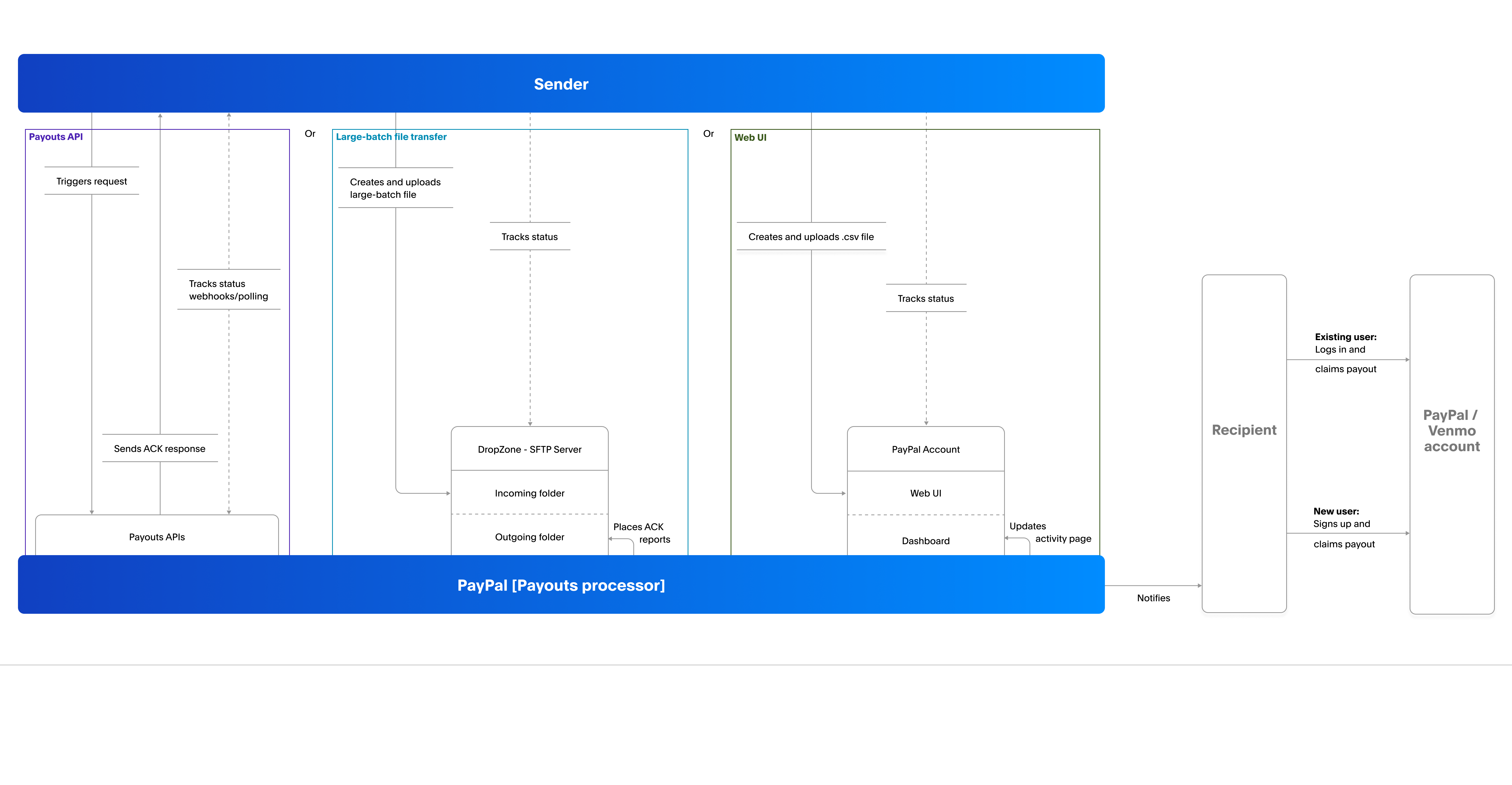
1. **Sender**: Initiates payouts using one of these integration patterns:
* **Payouts Web UI file upload**: Creates a CSV file, uploads it to the PayPal account, and clicks **Send Payouts**.
* **Large-batch file transfer**: Creates an input file and uploads it to the SFTP server.
* **Payouts API**: Sends an API request.
2. **PayPal**: Starts payouts processing and confirms successful start in one of these ways:
* **Payouts Web UI file upload status**: Updates the transaction status on the **Activity** page of the sender’s PayPal account.
* **Large-batch file transfer acknowledgment**: Uploads an ACK report in the `Outgoing` folder on the SFTP server.
* **Payouts API response**: Sends a response to the server that sent the API request.
3. **PayPal**: Notifies recipients about the payout.
4. **Recipient**: Claims the payout using one of the payout methods:
* **Recipient with a PayPal or Venmo account**: Logs into their account and claims the payout.
* **New recipient**: Opens a PayPal or Venmo account and claims the payout.
## Eligibility
**Available countries**: PayPal Payouts is available in 96 countries. See Supported countries.
**Available currencies**: You can pay in 24 currencies. See the PayPal Merchant Fees page for supported currencies.
**Available features**: PayPal Payouts lets users send, receive, and withdraw money. Recipients can also withdraw money in their local currency. You can offer an experience to recipients that matches their local language needs. All these features fall into four sets. Each country has a feature set and businesses in that country can use the features in their set. For information on countries and eligible feature sets, see Countries and supported features.
**Account type - Business account**: To integrate PayPal Payouts, PayPal must approve your business account for Payouts. Request access to the Payouts feature. PayPal notifies you about your access status through email.
## Important information
Ensure to review the following information before you send payouts.
### Sender fee
* PayPal applies a fee to each payout transaction. This fee is either a percentage of the payout amount or a flat rate if the sender uses Payouts API.
* Each transaction has a maximum fee limit, which depends on the payment currency.
* PayPal does not charge recipients any fees to receive payouts.
* Venmo payouts incur the same fee as PayPal Payouts in the US.
* If a payout requires currency conversion, extra charges apply. See PayPal currency conversion.
For accurate and up-to-date fee details, see the PayPal Merchant Fees page.
### Payout limits
The following table shows the individual and total payout limits for PayPal Payouts:
| Country | Individual payout maximum | Total payout maximum |
| --------------- | ------------------------------------------------------ | -------------------- |
| U.S. | \$20,000.00 USD | Unlimited |
| Other countries | Up to \$20,000.00 USD in your country's local currency | Unlimited |